

Introduction
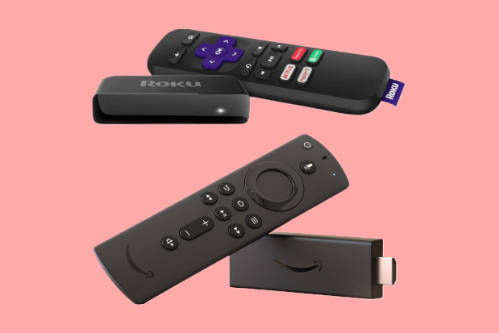
In technology, comparing Fire Stick and Roku is a pivotal debate among entertainment enthusiasts. These two streaming devices have revolutionized media consumption, offering many features to enhance the viewing experience. Whether accessing your favorite streaming services, playing games, or even controlling your smart home devices, Fire Stick and Roku have become synonymous with convenience and entertainment. Each device boasts unique strengths and functionalities, catering to diverse consumer preferences. Dive into Fire Stick vs Roku to uncover which device aligns best with your streaming needs and preferences.
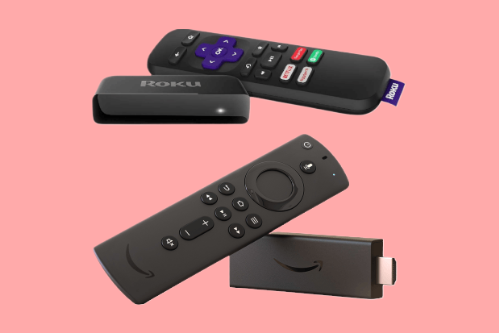
Fire Stick Vs. Roku
In the vast landscape of technology, the ongoing rivalry between Fire Stick and Roku remains a hot topic for tech enthusiasts worldwide. These compact streaming devices have redefined how we engage with digital content, offering various streaming options from popular services to niche channels. Whether you lean towards the user-friendly interface of Fire Stick or the extensive channel selection of Roku, each device presents a unique blend of features tailored to elevate your entertainment experience. Dive into the comparison of Fire Stick vs. Roku to unravel the nuances and decide which gadget best complements your streaming habits and preferences.
Key Differences Between Fire Stick and Roku Streaming Devices
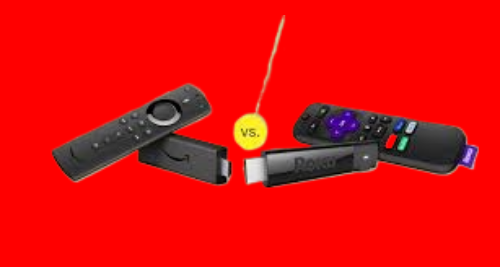
Fire Stick and Roku are both popular streaming devices designed to provide easy access to digital entertainment, but they differ in user experience and ecosystem integration. Fire Stick is closely connected to Amazon services, offering seamless access to Prime Video and voice control through Alexa, while Roku focuses on a neutral platform that supports a wide range of streaming channels without prioritizing a single brand. Interface layout, content discovery, and remote functionality also vary between the two, which can influence usability depending on personal preferences. Understanding these differences helps users choose a streaming device that aligns with their viewing habits and preferred features.
User Interface and Experience
Fire Stick
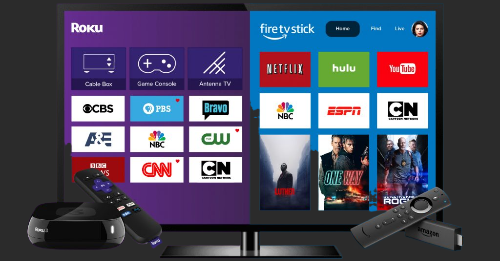
The Fire Stick’s user interface is sleek and visually appealing, focusing on Amazon Prime Video content. The home screen displays a combination of your apps, recently watched shows, and personalized recommendations. The integration of Alexa makes voice search intuitive and responsive, and you can even ask Alexa to play specific shows, open apps, or control playback.
Roku
Roku’s user interface is straightforward and user-friendly. The home screen is customizable, allowing you to arrange your apps and channels to your liking. Unlike the Fire Stick, Roku’s interface is more neutral and doesn’t prioritize any particular streaming service. This makes accessing a wide range of content from various providers easy without feeling overwhelmed by one dominant platform.
Content and Apps
Fire Stick
The Fire Stick shines when it comes to content availability. It supports many streaming services, including Netflix, Hulu, Disney+, YouTube, and Amazon Prime Video. Additionally, it offers access to a wide range of apps and games through the Amazon App Store. One standout feature is the integration with Amazon’s ecosystem, allowing you to access Amazon Music Kindle books more efficiently.
Roku
Roku is known for its extensive selection of streaming channels and apps. It supports all the primary streaming services like Netflix, Hulu, Disney+, and more. Roku also offers The Roku Channel, a free streaming service with various movies and TV shows. One of Roku’s strengths is its platform-agnostic approach, ensuring that all streaming services are equally accessible without bias towards a specific provider.
Performance
Fire Stick
The Fire Stick delivers solid performance, with fast load times and smooth playback. The newer Fire Stick 4K and Fire Stick 4K Max models support 4K Ultra HD, HDR, and Dolby Vision, providing excellent picture quality for compatible content. The device handles streaming, gaming, and other tasks efficiently, making it versatile for various entertainment needs.
Roku
Roku devices also offer reliable performance across the board. Models like the Roku Express are great for basic streaming needs, while the Roku Ultra provides top-tier performance with 4K UHD, HDR, and Dolby Vision support. The Roku Ultra also includes an Ethernet port for a more stable internet connection, which benefits users with slower Wi-Fi.
Voice Control and Smart Features
Fire Stick
Alexa integration is one of the Fire Stick’s most vital features. You can use voice commands to search for content, control playback, and even manage compatible smart home devices. The Fire Stick’s remote includes a dedicated Alexa button, making it easy to access voice controls anytime. Additionally, the Fire Stick supports screen mirroring and casting from compatible devices.
Roku
Roku’s voice control capabilities vary by model. Higher-end models like the Roku Ultra include voice search and control, allowing you to search for content and launch apps using voice commands. Roku also supports Google Assistant and Amazon Alexa, enabling you to control the device with your preferred voice assistant. Roku’s screen mirroring and casting features are also robust and compatible with Android and Windows devices.
Price and Value
Fire Stick
The Fire Stick is competitively priced, with the standard Fire Stick being one of the most affordable options on the market. The Fire Stick 4K and Fire Stick 4K Max are slightly more expensive but offer advanced features like 4K streaming and improved performance. Overall, the Fire Stick provides excellent value for its price, especially for users already invested in the Amazon ecosystem.
Roku
Roku offers a range of devices at different price points, from the budget-friendly Roku Express to the premium Roku Ultra. This variety allows users to choose a device that fits their budget and needs. While the higher-end models are more expensive, they come with additional features like enhanced remote controls, Ethernet ports, and superior performance. Roku’s diverse lineup ensures a device for every type of user.
Conclusion
In the Fire Stick vs Roku debate, both devices offer unique advantages. The Fire Stick excels with its Alexa integration and seamless access to Amazon services, making it ideal for Amazon-centric users. Meanwhile, Roku stands out with its platform neutrality and extensive content library, catering to a broader audience. Your choice should hinge on your specific needs and ecosystem preferences. Whether you opt for the Fire Stick’s robust voice control or Roku’s diverse content offerings, both promise a superior streaming experience tailored to different user demands.
If you want to read an interesting article about it, explore our “Hardware” category.
FAQs
The main difference is that Fire Stick integrates closely with Amazon services, while Roku offers a more neutral, platform-agnostic interface.
Yes, the Fire Stick and higher-end Roku models support 4K streaming.
Both devices support voice control, but the Fire Stick features Alexa integration, while Roku supports Google Assistant and Alexa.
The main difference lies in their ecosystems. Fire Stick integrates closely with Amazon services, while Roku offers a more platform-neutral streaming experience.
Many users find Roku easier to use due to its simple interface, though Fire Stick offers added convenience for those already using Amazon services.