


Introduction
The humble home printer has undergone a remarkable transformation in the ever-evolving world of technology. Once a cumbersome and often temperamental piece of equipment, the home printer has emerged as a versatile and essential tool for modern households. From home printers for family photos to managing important documents, the home printer has become an indispensable part of our daily lives.
Choosing the Right Home Printer for Everyday Needs
Home printers are designed to balance convenience, functionality, and affordability, making them an essential tool for everyday tasks such as document printing, school assignments, and occasional photo output. Most home printers fall into inkjet or laser categories, each catering to different usage patterns—inkjet printers are often favored for color and photo printing, while laser printers are valued for speed and efficiency in text-heavy documents. Factors such as print quality, running costs, connectivity options, and space requirements play an important role in determining which model best suits a household. Understanding these core considerations helps users make informed decisions based on their specific printing needs.
The Early Days of Home Printers
The history of home printers can be traced back to the 1980s when personal computers began to gain mainstream popularity. During this time, the dot-matrix printer was the predominant technology, offering basic functionality at a relatively affordable price. These early printers were bulky, noisy, and often produced low-quality output, but they served as the foundation for the modern home printer.
As technology advanced, the introduction of inkjet printers in the late 1980s marked a significant turning point. Inkjet printers offered higher-quality printing, quieter operation, and a more compact design. This made them more appealing to home users, who were no longer relegated to the clunky dot-matrix machines of the past.
Types of Home Printers
Home printers come in various types, each designed to meet different needs. Understanding the different types can help you choose the best printer for your home.
1. Inkjet Printers
The most popular kinds of home printers are inkjet models. To make a picture, they mist microscopic ink droplets over paper. Because of their versatility, text documents, images, and graphics may be printed using inkjet printers. They provide high print quality and are often reasonably priced.
Advantages:
- High-quality photo printing
- The generally affordable initial cost
Disadvantages:
- Ink cartridges can be expensive
- Slower print speeds compared to laser printers
2. Laser Printers
Laser printers use a laser beam to produce an image on a drum, which is then transferred to paper using toner. These printers are known for their fast print speeds and high-quality text output, making them ideal for printing large documents.
Advantages:
- Fast print speeds
- High-quality text printing
- Lower cost per page compared to inkjet printers
Disadvantages:
- Higher initial cost
- Not as suitable for photo printing
3. All-in-One Printers
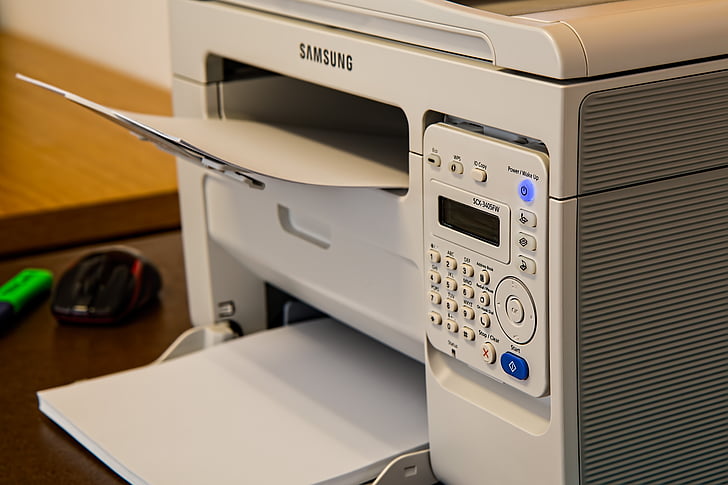
All-in-one printers, also known as multifunction printers, combine printing, scanning, copying, and sometimes faxing into a single device. These printers are highly convenient and can save space by eliminating the need for multiple devices.
Advantages:
- Versatile functionality (print, scan, copy, fax)
- Space-saving design
- Cost-effective for multiple functions
Disadvantages:
- Can be more expensive than single-function printers
- May have higher maintenance costs
4. Photo Printers
Photo printers are specialized printers designed specifically for printing high-quality photos. They use advanced ink technologies to produce vibrant and detailed images, making them ideal for photography enthusiasts and professionals.
Advantages:
- Excellent photo quality
- Can print on various photo paper types
- Specialized ink cartridges for better color accuracy
Disadvantages:
- Expensive ink cartridges
- Generally, slower print speeds
The Environmental Impact of Home Printers
As the world has become more environmentally conscious, the home printer industry has also had to address its ecological footprint. Manufacturers have responded by developing more energy-efficient printers, using fewer resources, and generating less waste.
One such innovation is the introduction of eco-friendly ink and toner cartridges. These cartridges are designed to minimize the amount of waste generated, often through refillable or recyclable components. Additionally, many modern printers come equipped with energy-saving modes and automatic sleep/standby features, reducing their environmental impact.
Key Features to Consider
Several key features should be considered when choosing a home printer to ensure you get the best device.
1. Print Quality
Print quality is among the most crucial things to think about. Look for printers with high DPI ratings (dots per inch), indicating better print resolution and detail. Inkjet printers typically offer better photo quality, while laser printers excel at printing sharp text.
2. Print Speed
The pace of printing is expressed in pages per minute (PPM). You can save time by using a printer with a higher PPM if you regularly print huge documents. When compared to inkjet printers, laser printers often have quicker print rates.
3. Connectivity Options
Modern home printers have various connectivity options, including USB, Wi-Fi, and Bluetooth. Wireless connectivity allows you to print from multiple devices without being physically connected to the printer. Some printers also support mobile printing through apps like Apple AirPrint and Google Cloud Print.
4. Paper Handling
Think about the many kinds and sizes of paper the printer can print on. If you need to print on different paper types (e.g., photo paper, cardstock), ensure the printer supports these options. Also, check the paper tray capacity to handle your typical print volume.
5. Cost of Consumables
Cartridges for ink or toner might get expensive over time. Look for printers with affordable consumables and consider the cost per page. Some printers also offer high-yield cartridges that can save money in the long run.
6. Additional Features
Additional features like automatic duplex printing (printing on both sides of the paper), an automatic document feeder (ADF), and touchscreens can enhance the functionality and convenience of your home printer.
Top Home Printer Brands
Several brands are well-known for their high-quality home printers. Here are some of the top brands to consider.
1. HP (Hewlett-Packard)
HP is a leading printer industry brand known for its reliable and versatile printers. HP offers various models, including inkjet, laser, and all-in-one printers, catering to different needs and budgets.
2. Canon
Canon is renowned for its excellent photo printers and high-quality inkjet printers. Canon printers are known for their vibrant color output and advanced printing technologies, making them popular for photographers and creative professionals.
3. Epson
Epson is another top brand offering a range of inkjet and all-in-one printers. Epson printers are known for their innovative features, such as EcoTank models with refillable ink tanks, which can significantly reduce the cost of printing.
4. Brother
Brother is well-known for its reliable laser printers and all-in-one models. Brother printers are often praised for their fast print speeds, low cost per page, and robust build quality, making them an excellent choice for home offices.
5. Samsung
Samsung offers a range of high-quality laser printers known for their sleek design and advanced features. Samsung printers are top-rated for their fast print speeds and high-quality text output.
Conclusion
A home printer is a valuable tool for many tasks, from printing documents and photos to scanning and copying. By understanding the different types of printers, key features, and top brands, you can choose the best printer for your needs. Regular maintenance and proper care will ensure your printer remains reliable and produces high-quality prints for years. Whether you need an inkjet for vibrant photos, a laser printer for fast text documents, or an all-in-one for versatile functionality, a home printer is perfect for you.
Apart from that if you want to know about “Fire Stick Vs Roku: A Technical Look at Processing Power and Performance, Performance, Features & Much More” then please visit our “Hardware” Category.
FAQs
Duplex printing is the ability to automatically print on both sides of the paper. This feature saves paper and is ideal for printing double-sided documents without manually flipping the pages.
Regular maintenance includes cleaning the printer, using the correct paper types, updating firmware and drivers, monitoring ink or toner levels, and performing manufacturer-recommended maintenance tasks like print head alignment and nozzle cleaning.
While third-party cartridges are often cheaper, they may not always provide the same print quality or reliability as OEM (Original Equipment Manufacturer) cartridges. Additionally, using third-party cartridges can sometimes void the printer’s warranty.
Inkjet printers use liquid ink and are better for color and photo printing, while laser printers use toner and are faster and more efficient for text-heavy documents.
Inkjet printers are commonly preferred for home use due to their affordability and ability to print both text and photos, while laser printers are ideal for high-volume text printing.