



Introduction
When it comes to optimizing your Mac experience, selecting the right mouse can make a significant difference. Whether you’re a creative professional, a gamer, or someone who spends hours on productivity tasks, finding a mouse that complements your Mac’s functionality and aesthetics is essential. This guide will help you navigate through the top choices and considerations for the best mouse for Mac.
Why Choosing the Right Mouse Matters
A mouse is more than just a pointing device; it’s a crucial interface that can enhance productivity, provide comfort, and improve your overall computing experience. For Mac users, finding a mouse that seamlessly integrates with macOS and matches the sleek design of Apple products is particularly important.
Key Features to Consider for the Best Mouse for Mac
When selecting the best mouse for Mac, certain features can significantly enhance the user experience, especially in terms of comfort and functionality. Ergonomic design helps reduce strain during extended use, while compatibility with macOS ensures smooth gesture support and seamless integration with system settings. Precision tracking and customizable buttons are also valuable, as they allow users to tailor mouse behavior to specific workflows, whether for creative work, productivity, or general navigation. Focusing on these features makes it easier to choose a mouse that complements a Mac setup and improves daily computing tasks.

Key Features to Consider
1. Compatibility
Ensure the mouse is fully compatible with macOS. Some mice offer features specifically designed for Mac, such as enhanced gesture support or seamless integration with macOS features like Mission Control and Launchpad.
2. Design and Aesthetics
Apple users often value design as much as functionality. Look for a mouse that complements the minimalist and elegant aesthetic of your Mac. Materials and colors that match or enhance your Mac’s look can contribute to a cohesive workspace.
3. Ergonomics
Comfort is crucial, especially if you use your computer for long periods. Ergonomic design helps prevent strain and repetitive stress injuries. Consider a mouse that fits well in your hand and offers customizable grip options.
4. Battery Life and Charging
For wireless mice, battery life is an important factor. Some mice come with rechargeable batteries, while others use replaceable AA or AAA batteries. Opt for a mouse with a long battery life or quick-charging capabilities to minimize interruptions.
5. Functionality and Customization
Advanced features like programmable buttons, adjustable DPI settings, and customizable profiles can enhance your productivity and gaming experience. Choose a mouse that offers the level of functionality you need for your tasks.
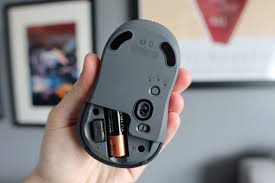
Factors to Consider When Choosing the Best Mouse for Mac
- Connectivity: Opt for a mouse that offers reliable connectivity options such as Bluetooth or USB-C to ensure seamless pairing with your Mac.
- Ergonomics: Look for a mouse that fits comfortably in your hand and supports a natural wrist position to prevent strain during long hours of use.
- Customizability: Choose a mouse that allows for button remapping, adjustable sensitivity, and customizable settings to tailor the mouse to your preferences.
- Battery Life: Opt for a mouse with a long-lasting battery to minimize interruptions and ensure uninterrupted usage.
Top Picks for the Best Mouse for Mac Users
- Logitech MX Master 3: Known for its ergonomic design, customizable buttons, and precise tracking, the Logitech MX Master 3 is a favorite among Mac users for its versatility and comfort.
- Apple Magic Mouse 2: If you prefer seamless integration with your Mac and multi-touch gestures, the Apple Magic Mouse 2 is an excellent choice, offering a sleek design and wireless connectivity.
- Razer Death Adder V2: Ideal for gamers and creative professionals, the Razer DeathAdder V2 boasts high DPI levels, customizable RGB lighting, and responsive buttons for a premium experience.
- Microsoft Surface Precision Mouse: Featuring ergonomic design, customizable buttons, and smooth scrolling, the Microsoft Surface Precision Mouse is a versatile option for Mac users seeking comfort and precision.
Key Considerations When Selecting Your Ideal Mouse
- Usage: Identify your primary use case for the mouse, whether it’s general productivity, gaming, graphic design, or programming, to narrow down your options based on specific requirements.
- Ergonomics: Choose a mouse that fits comfortably in your hand and supports a natural hand position to prevent strain and discomfort during extended use.
- Connectivity: Consider whether you prefer a wired or wireless mouse, as well as the type of connectivity options available (USB, Bluetooth, etc.).
- Sensitivity and DPI: Determine the level of sensitivity and DPI (dots per inch) that best suits your needs, especially if you engage in tasks that require precise cursor control.
- Customizability: Look for mice with programmable buttons, adjustable sensitivity settings, and software customization options to tailor the mouse to your preferences.
Compact and Versatile for On-the-Go Use
The Logitech MX Anywhere 3 is the ideal mouse for users who need a portable yet high-performing device. Its compact design makes it easy to carry, while still offering robust features like a high-precision sensor and customizable buttons. This mouse is perfect for professionals and frequent travelers who need a reliable device that performs well on various surfaces.
Key Features:
- High-Precision Sensor: Tracks on almost any surface, including glass.
- Customizable Buttons: Enhance productivity with programmable functions.
- Easy-Switch Technology: Switch between three devices effortlessly.
Pros:
- Highly portable
- Versatile tracking on different surfaces
- Long battery life
- Customizable features
Cons:
- Smaller sizes may not be ideal for extended use
- Premium price for a compact mouse
Performance and Customization for Gamers
The Logitech G502 X Hero is an advanced gaming mouse designed to meet the demands of competitive gamers. It features a high-performance HERO 25K sensor with adjustable DPI settings, customizable weights, and programmable buttons. This mouse is built for precision and responsiveness, making it a top choice for those who require top-tier performance.
Key Features:
- HERO 25K Sensor: High-precision tracking with up to 25,600 DPI.
- Customizable Weights: Adjust the weight for personalized handling.
- Programmable Buttons: Assign macros and commands for gaming.
- Adjustable DPI Settings: Switch between sensitivity levels on the fly.
- RGB Lighting: Personalize the look with customizable lighting effects.
Pros:
- High DPI and precision
- Customizable weight and buttons
- Adjustable DPI settings
- Stylish RGB lighting
Cons:
- Larger and heavier designs may not be suitable for all users
- Mainly designed for gaming, which may limit its appeal to general use
Read More: – Pixel 7 and Pixel 7A
Conclusion
In conclusion, finding the best mouse for your Mac involves considering factors such as connectivity, ergonomics, customizability, DPI, and battery life. Whether you prioritize comfort, precision, or customization, there is a wide range of options available to enhance your Mac experience. By selecting a mouse that aligns with your preferences and usage habits, you can optimize your productivity and enjoy a seamless computing experience on your Mac.
Apart from that if you want to know about “Samsung Fold 5” then please visit our “Technology” Category.
FAQs
Yes, the Logitech MX Master 3S is highly recommended for Mac users seeking an ergonomic mouse. Its contoured design supports a natural hand position and offers customizable buttons and advanced scrolling features, enhancing comfort and productivity.
The Logitech MX Anywhere 3 is an excellent choice for those needing a portable mouse. Its compact design makes it easy to carry and offers high-precision tracking on various surfaces, making it a versatile option for users on the go.
Yes, you can use a gaming mouse with a Mac. The Razer DeathAdder V2 Pro is a great example. While it’s designed for gaming, its high-precision sensor and customizable features make it suitable for high-performance tasks and applications on a Mac.
The best mouse for Mac offers full macOS compatibility, smooth cursor tracking, gesture support, and comfortable ergonomics for long-term use.
Not all mice are optimized for macOS. The best mouse for Mac is designed to work seamlessly with macOS features and system preferences.