



A terabyte is a large unit used to measure digital storage capacity. If you’re wondering how much is a terabyte, 1 TB equals 1,000 gigabytes under standard decimal measurements. That also equals exactly one trillion bytes.
For U.S. shoppers, this definition applies to most advertised SSDs, hard drives, computers, and other storage devices. The number can look different after connecting a drive to a computer. That difference usually comes from how software calculates and displays storage.
Quick answer: One terabyte equals 1,000 GB, 1,000,000 MB, or one trillion bytes using standard decimal storage units. A 1 TB drive may appear near 931 GiB in software using binary-sized measurements. Your actual available space can be lower after formatting, system files, applications, and recovery data are included.
| Storage measurement | Amount |
|---|---|
| 1 TB | 1,000 GB |
| 1 TB | 1,000,000 MB |
| 1 TB | 1,000,000,000 KB |
| 1 TB | 1,000,000,000,000 bytes |
| 1 TB expressed in GiB | About 931.32 GiB |
| 1 TiB | 1,024 GiB |
Key Takeaways
- One TB contains one trillion bytes under standard decimal measurements.
- Storage manufacturers generally use 1 TB to mean 1,000 GB.
- A 1 TB drive equals about 931.32 GiB when converted to binary-sized units.
- File sizes determine how many photos, videos, games, or documents will fit.
- System files and formatting can reduce the storage available for personal files.
- Storage capacity does not tell you how fast an SSD or hard drive performs.
How Much Is a Terabyte in GB, MB, and Bytes?
The simplest conversion starts with 1 TB equaling 1,000 GB. Each gigabyte contains 1,000 megabytes under the same decimal system. Therefore, one TB contains 1,000,000 MB and one trillion bytes.
These decimal units are useful when comparing advertised storage capacities in the United States. Drive manufacturers typically list their products using these measurements. This keeps comparisons between 500 GB, 1 TB, and 2 TB products straightforward.
You may also encounter a different answer based on binary measurements. Binary units use names such as gibibyte, written GiB, and tebibyte, written TiB. Mixing those units with GB and TB creates much of the confusion surrounding storage capacity.
Why Do Some People Say 1 TB Is 1,024 GB?
Computers have historically measured some quantities using powers of two. That history led people to describe 1,024 gigabytes as a terabyte in everyday conversation. Modern measurement standards use separate names for those binary quantities.
The decimal and binary systems should not be treated as interchangeable. One TB is 1,000 GB, while one TiB equals 1,024 GiB. Keeping the labels separate makes storage specifications much easier to understand.
This distinction also explains conflicting answers across older websites and software. A specification using TB usually refers to decimal capacity. Documentation using TiB refers to the binary measurement instead.
For the detailed conversion, see SciTechWiz’s guide on how many gigabytes are in a terabyte.
Why Does a 1 TB Drive Show About 931 GB?
A drive advertised with 1 TB contains one trillion bytes before other storage usage is considered. Divide those bytes by 1,073,741,824 bytes per GiB. The result is approximately 931.32 GiB.
That calculation can make your new drive appear smaller than expected. The physical bytes did not disappear during installation. The computer is expressing the capacity with a different measurement convention.
Formatting and system data can reduce available storage further. Recovery partitions, operating-system files, and file-system information can consume additional space. Free storage may therefore be lower than the drive’s raw displayed capacity.
This behavior can occur with both solid-state drives and traditional hard drives. It does not indicate that one technology inherently loses more advertised capacity. Always distinguish rated capacity from available user storage.
How Much Can 1 TB Hold?
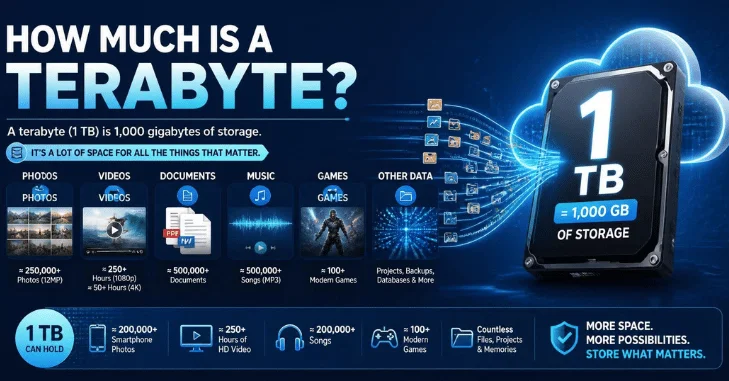
There is no exact universal number of files that fit into 1 TB. Photos, movies, games, and documents can have dramatically different file sizes. Compression settings and file formats also change storage requirements.
The estimates below use simple example sizes for easy planning. Your files may be considerably larger or smaller. System files and reserved storage are also excluded from these examples.
| File type | Example file size | Approximate amount in 1 TB |
|---|---|---|
| Smartphone photos | 5 MB | 200,000 photos |
| Larger photos | 10 MB | 100,000 photos |
| Music files | 10 MB | 100,000 songs |
| HD movie files | 4 GB | 250 movies |
| Large games | 50 GB | 20 games |
| Extra-large games | 100 GB | 10 games |
| Video project files | 25 GB | 40 projects |
These estimates become more useful when you substitute your own average file sizes. Check several existing files or folders on your current device. Then divide the available capacity by your typical file size.
A photographer storing 25 MB RAW files will get different results from someone saving compressed phone pictures. Gamers also face wide variations between individual game installations. Your personal usage pattern matters more than a generic capacity estimate.
Is 1 TB a Lot of Storage?
One TB provides substantial capacity for many everyday computer users. Documents, web downloads, applications, and ordinary photo libraries usually consume space gradually. People who stream most entertainment may also need less local storage.
Gaming and creative work can change the calculation quickly. Large games can occupy dozens of gigabytes, while video projects can consume hundreds. Virtual machines and local backups can also use storage faster than expected.
A useful comparison is 512 GB versus 1 TB. The larger option provides nearly twice the advertised capacity of a 512 GB device. That extra room can matter when storage cannot be upgraded later.
SciTechWiz’s Samsung Fold 5 specifications provide a real device example with storage options reaching 1 TB. The site’s iPhone 14 Plus and iPhone 14 Pro Max comparison also shows how storage tiers vary between devices. These examples show why capacity can influence a purchasing decision.
Is 1 TB Enough for Gaming?
One TB can support a moderate game library, but game sizes vary widely. Smaller titles may require relatively little space. Major releases can require far more storage after updates and downloadable content.
Suppose your installed games average 50 GB each. The raw decimal capacity represents space for about 20 games at that average size. Your operating system and other applications will reduce the space available for games.
Players who keep several large titles installed may prefer more capacity. Removing finished games can make a smaller drive easier to manage. An additional internal or external drive can also provide room for future installations.
Is 1 TB Enough for Photos and Videos?
For photos, this capacity can hold a substantial personal collection. A 10 MB average would represent roughly 100,000 images before other storage usage. RAW photography requires considerably more room because individual files are larger.
Video storage depends heavily on resolution, bitrate, codec, and recording length. High-resolution footage can consume storage much faster than compressed movies. Video editors should estimate capacity using their own camera settings whenever possible.
Check a recent video folder before choosing a drive. Divide its size by the total recording time to estimate your typical usage. This gives you a more realistic number than a generic online estimate.
TB Measures Capacity, Not Storage Speed
Storage capacity and storage performance describe different characteristics. A larger drive does not automatically read or write files faster. A 2 TB hard drive can hold more data than a 1 TB SSD while performing slower.
The storage technology and interface affect performance more directly. SSDs generally provide faster access than mechanical hard drives. Interface standards and the specific device can also influence transfer speeds.
Keep this difference in mind when shopping for a computer or external drive. Capacity tells you how much data fits. Performance specifications tell you how quickly that data can be accessed.
How to Decide Whether You Need 1 TB
Start by checking your current device’s storage usage. Look at how much space your photos, games, applications, videos, and work files consume. This establishes a useful baseline before buying another device.
Next, consider how quickly your collection is growing. A computer that already uses 700 GB could outgrow a similar capacity quickly. Buying extra room can reduce the need for frequent file management.
Also consider whether your new device supports storage upgrades. Desktop computers often provide more expansion options than thin laptops or phones. A difficult-to-upgrade device can make higher initial capacity more useful.
For broader device comparisons, SciTechWiz’s laptop guides show how storage tiers appear alongside other hardware specifications. Capacity should be considered with performance, upgrade options, and your expected workload. No single storage size is ideal for every user.
Frequently Asked Questions
How much is a terabyte compared with a gigabyte?
One TB equals 1,000 GB under the decimal system used for standard storage labeling. A gigabyte is therefore one-thousandth of a TB. Binary measurements use GiB and TiB instead.
Is 1 TB exactly 1,024 GB?
No, standard decimal measurements define 1 TB as 1,000 GB. The binary relationship is 1 TiB equals 1,024 GiB. Older explanations sometimes mix these different unit names.
Why does my 1 TB SSD show only about 931 GB?
The difference comes mainly from decimal and binary-sized measurements. One trillion bytes equals approximately 931.32 GiB. Formatting and system files can reduce available space further.
Is 1 TB bigger than 500 GB?
Yes, one TB represents 1,000 GB of advertised decimal capacity. It therefore contains twice the rated storage of a 500 GB drive. Actual available space can be lower on both devices.
How many photos can fit in 1 TB?
The answer depends on the average size of each photo. At 10 MB per image, the raw capacity represents roughly 100,000 photos. RAW and other large image formats will reduce that number.
How many games can 1 TB hold?
Game sizes vary too much for one exact answer. At an average installation size of 50 GB, the raw capacity represents about 20 games. Operating-system files and other data reduce the space available for installations.
Choosing Storage With the Numbers in Context
One trillion bytes sounds enormous until large games, videos, and backups begin accumulating. Understanding the units makes advertised capacities easier to compare. It also explains why the number displayed by a computer may differ from the package.
Check your current usage before choosing your next storage capacity. Estimate how much your files could grow during the device’s useful life. Then select enough headroom for applications, updates, new files, and future projects.
For more storage terminology and conversion details, continue with SciTechWiz’s terabyte explainer and TB-to-GB conversion guide. Both cover the measurement systems behind common storage labels. Knowing those basics makes future device comparisons much easier.